


What is A/B & A-only refers to?
A/B refers to partition names. A is one partition and B is another partition whereas A only (can be called as B only too) is only a single partition system .
Lets start from understanding the BASICS:-
What is a Partition?
A partition is a discrete, contiguous, but non-overlapping section within the phone’s storage where data is stored. There are partitions for bootloaders, various firmware, user data, OS files, and so on. For the most part, these files live in their own partitions, and you can wipe, format, and edit them without affecting files on other partitions.
In plain English , consider your device storage as A HOUSE with VARIOUS ROOM, and each partition is a room.
How do updates are performed in :-
Updation in A only partition system-
Android devices without A/B partitions have the following partitions, “boot, system, vendor, userdata, cache, recovery, misc“.
Lets have a look at the life cycle of Non-A/B system update.
- Devices perform checks with OTA servers and get notified of the availability of an update.
- Downloads OTA packages to a cache or data partition.
- Cryptographic signature is verified against the certificates in /system/etc/security. If everything looks fine, User is prompted to install the update.
- Device reboots into recovery mode.
- Recovery verifies the cryptographic signature of the package against the public keys in /res/keys(part of the RAM disk contained in the recovery partition).
- Extracts the package to update the boot, system, and/or vendor partitions as necessary.
- The system partition contains the contents for the new recovery partition(optional).
- Device reboots normally.
- The newly updated boot partition is loaded, and it mounts and starts executing binaries in the newly updated system partition.
- As part of normal startup, the system checks the contents of the recovery partition against the desired contents (which were previously stored as a file in /system). They are different, so the recovery partition is re-flashed with the desired contents from system partition. (On subsequent boots, the recovery partition already contains the new contents, so no re-flash is necessary.)
The system update is complete!
When non-A/B devices perform the above 8 steps for OTA upgrade their active partition or boot partition changes as shown in the picture below.
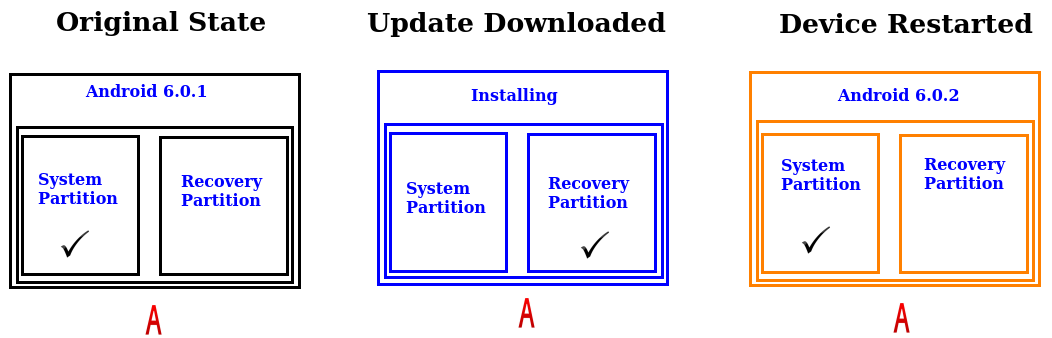
Updation in A/B partition system –
A/B system updates, also known as seamless updates, ensures a boot able system and minimum downtime when performing a OTA update.
Seamless updates work by having two different system partitions on a device. When using a device that can perform seamless updates, all the transferring is done while one system partition is running, as things are copied and moved into the second partition. The way Android is divided into individual partitions means the data portion — where all the information you’ve entered about an app, things like address books or settings or game save progress — are stored in a separate spot outside of the place where the actual system files live. This is good for system security (the data partition can have its own set of file and folder permissions) and it makes things pretty convenient for seamless updates.
Once all this is done, you can reboot and use the new system partition. This is done without moving the partitions or renaming them because they are numbered. A configuration file used during the boot process is read that tells the kernel and boot process where each partition starts and stops. This file is changed to point to the new system partition instead of the current one(becomes inactive). The next time you update, the other system partition will be wiped and used. They swap back and forth seamlessly.
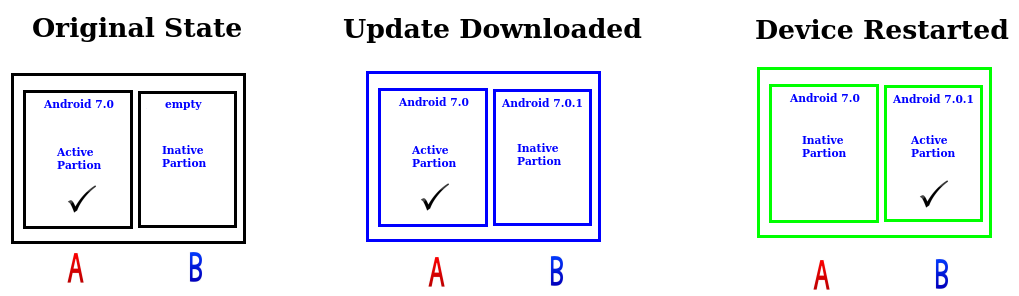
Seamless updates aren’t a requirement for manufacturers. Your existing device partitions may not be A/B partitioned and won’t be able to perform seamless updates.
A/B OTA updates use more space on your devices internal storage. It uses a complete second system partition. Expect a couple of gigabytes to be used and reserved for it.
remember that there will be no cache partiton in A/B system, It now resides in the data partition and is no longer used for anything related to updates. One result is that wiping cache in twrp no longer does anything.
A Quick comparison of A/B and Non A/B update
| # | Components | A/B Updates | Non A/B Updates |
| 1 | Recovery Partition available | No | Yes |
| 2 | OS | Partition A and Partition B | Only one Partition |
| 3 | Downtime | Minimal | High |
| 4 | Size | Requires High | Medium |
| 5 | Bootloader changes | Yes | Yes |

 Techno Shab's Blog